
Each membership type can be offered on your website to new members, to existing members, or only to holders of certain memberships. These settings limit what visitors and members see: in the back office, you can always assign any membership type to a member.
In this article:
New members and existing members
- Go to Members > Settings > Membership Types, then click the membership type to set up.
- In the Type tab, find the Availability of the type of membership on your website section.
- Check the boxes you need, then click Save.
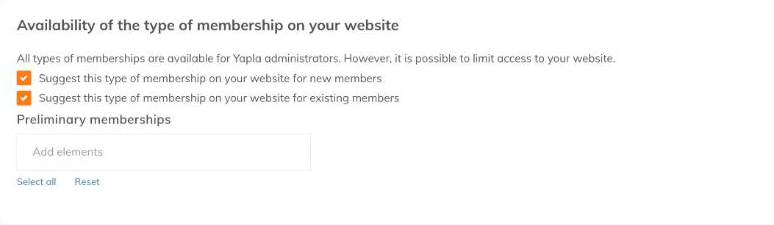
- Both boxes checked: the type is offered to people joining for the first time and to members who renew.
- Suggest this type of membership on your website for existing members only: the type is reserved for renewal. It is not shown to new members and appears in the member area when the member renews.
- Suggest this type of membership on your website for new members only: the type is reserved for first memberships.
- No box checked: the type is not offered on your website; only the back office can assign it.
The Membership Types list summarizes these settings in the New Members and Existing Members columns.
The system decides which box applies based on the member's current membership. A member whose membership is active is an existing member. If the membership has expired, the member remains an existing member during the configured retroactive period; after that, or if there is no retroactive period, the member is treated as a new member. See New membership or renewal: understand how a membership is classified.
Preliminary memberships
The Preliminary memberships field is available with the Premium plan.
In the same section, the Preliminary memberships field reserves the type for members whose current membership is in the list. For example, to purchase membership B, the member must hold membership A.
- Add to the field the membership types that give access to this type, then click Save.
- The current membership is the one the system keeps for the member, even if it has expired. Older memberships in the member's history do not count.
- Left empty, the field does not restrict access.
Preliminary memberships only filter signed-in members. If Suggest this type of membership on your website for new members is checked, a visitor who is not signed in sees the type on your membership page. To reserve the type for holders of the preliminary memberships, uncheck this box.
Examples of use
- Retain your members: offer your current members a cheaper renewal type or one with more benefits, reserved for existing members or for holders of a preliminary membership.
- Change type for a new year: create a new type (new rate, new period) and offer it to existing members. See Move your members to a new membership type at renewal.